Speedtest
Quick Fix
Manually select a test server in Portugal
Speedtest defaults to a server in Cyprus for some IP ranges, which makes results look slow. Force a Portugal server to get accurate numbers.
- In the app / website: manually select a test server located in Portugal.
- On a Linux server (CLI):
# Remove old speedtest-cli
apt-get remove -y speedtest-cli

# Install dependencies
apt install gnupg1 apt-transport-https dirmngr -y

# Install official Ookla speedtest
curl -s https://packagecloud.io/install/repositories/ookla/speedtest-cli/script.deb.sh | bash
sudo apt-get install speedtest

# Run it against a Portugal server
speedtest --server-id=44427
Find server id
Get the current list of servers in Portugal. Change the search parameter to find any other location
# Install curl and jq
apt install curl jq -y
# Get list of servers in Lisbon
curl -s "https://www.speedtest.net/api/js/servers?engine=js&https_functional=true&limit=1000&search=Lisbon"   | jq '.[] | {id, sponsor, name}'
tl;dr: speedtest results are not accurate without adjustement
Slow network - Wrong speedtest results (Portugal only)
- Your test server MUST BE in Portugal
- For some IP ranges, Speedtest sets the test servers in Cyprus
Why? And how to fix?
- Speedtest sets the test server location based on the ISP location, not the actual datacenter location
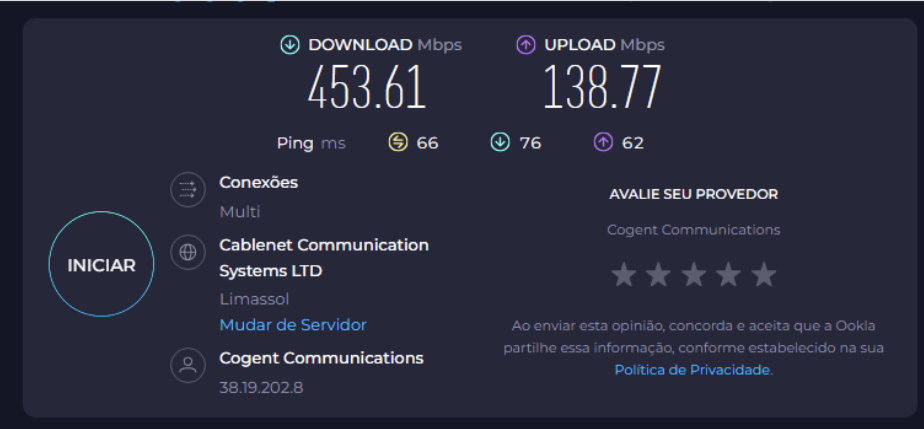
- Since the ISP is registered in Cyprus, Speedtest will run the test over the distance of 3800km, instead of 5km
- To fix this, you need to manually select a test server in Portugal
Before update (default)
Test server is in Cyprus, 3800km away
Updated ISP country to Portugal
After updating to datacenter country, the speedtest results are accurate